
If you are building a server for a homelab or business and you are confused about choosing between Ubuntu 26.04 or Fedora 44 Linux distributions, then you have come to the right place. Basically, you need the best performance, modern packages, etc.
This year, the heavyweight match-up is Ubuntu 26.04 vs Fedora 44. Both bring massive updates and the best environment, but both are built on different philosophies regarding package management, file systems, and hardware security. Just like same-same but different.
If you are building a local development environment, spinning up Docker containers, or making your SaaS platform, then you need a Linux distribution, so we will show you all the differences between Ubuntu 26.04 and Fedora 44 in a deep comparison.
Release Cycles & Philosophy
Fedora 44 is built for the bleeding edge. Fedora runs on a strict 6-month release cadence, with each release supported for exactly 13 months. If you want the newest kernel, GNOME desktop, and developer tools, Fedora is your playground. Because their core stack is modern, featuring Wayland, Pipewire, GNOME, systemd, and NetworkManager, and packages like gnome-shell, gnome-control-center, grub, and NetworkManager.
Ubuntu 26.04 gives you long-term support. Its LTS release is designed to be installed once and depended on for years. This Linux distribution is like a set-it-and-forget-it kind of stability.
File Systems, Memory, and Hardware
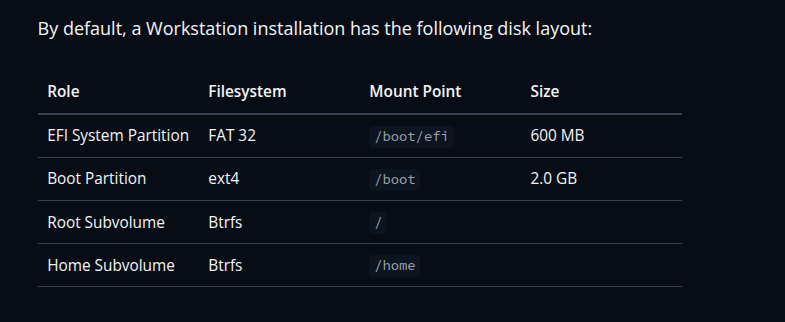
For a good experience, hardware with a 40GB SSD disk and 4GB RAM is recommended for Fedora 44 in the official documentation. It defaults to Btrfs with transparent compression across the root (/) and /home subvolumes, saving you disk space and reducing SSD wear. Its exact boot layout requires a 600MB FAT32 /boot/efi and a 2.0GB ext4 /boot partition.
Fedora 44 does not use a dedicated swap partition. Instead, it uses ZRAM. If you are using Fedora OS on your system, then when your system's memory usage increases, ZRAM handles it in the best way. When the system is running out of memory, Fedora automatically forces processes to quit. It uses command-line tools to investigate and diagnose issues like System Monitor, Logs, Problem Reporting, top, journalctl, and coredumpctl.
Ubuntu 26.04 uses massive security features for users. Its best security feature is Hardware-backed full disk encryption (FDE) via your motherboard's TPM (Trusted Platform Module).
With TPM disk encryption, you don't have to enter a PIN every time you boot up. The TPM automatically unlocks the drive after checking that your BIOS/UEFI and bootloader haven't been modified. For your homelab setup: if your system encryption is tied directly to your hardware, doing things like updating the firmware, resetting the TPM, or changing Secure Boot settings will trigger the security system. If that happens, it will demand a recovery key, so make sure you don't lose that key.
Display & Desktop Environments
Both distributions use GNOME as their desktop, but their core philosophies are different.
Fedora 44 makes for a modern display experience. Wayland isn't just the default; it's baked directly into the non-removable core stack alongside gnome-shell, gnome-control-center, and Pipewire. Fedora gives you an incredibly pure, highly optimized Wayland.
Ubuntu 26.04 still uses GNOME, but they focus on building the display UI layer. The graphical setup is connected deeply with GTK4 and GTK3 tools. The GNOME on-screen keyboard, Orca screen reader, and BRLTTY are linked to the display layer using D-Bus.
The Package Manager War
Fedora 44 Workstation includes the GNOME Software app, which makes it easy to install apps and software updates. Fedora 44 uses DNF to maintain packages by automatically checking for dependencies and determining the actions required to install packages. The Flatpak tool is used to install and update graphical applications that are provided as Flatpaks. For hardware firmware updates, it hooks into LVFS using fwupdmgr. For installing proprietary NVIDIA drivers and setting up H.264 video codecs automatically, it also uses third-party repositories.
Ubuntu 26.04 leans into Snaps. The App Center defaults to them, meaning apps run in a secure sandbox, update automatically every day, and rely on base systems like core26. Even though Snaps take up more disk space because they package all their own dependencies, they give you the best security isolation.
Hardware & Connectivity Stacks
Fedora 44 handles motherboard and peripheral firmware updates right out of the box using native LVFS and fwupdmgr integration. Because the Fedora team is committed to open-source software, they don't include any proprietary binary blobs on the standard installation ISO. This means that you will need to manually check a box to enable third-party repositories if you want to install NVIDIA drivers.
Ubuntu 26.04 takes a solid, well-documented approach to connectivity. Its Bluetooth setup relies on the core bluetooth and btusb driver modules inside the kernel, which then hand things off to BlueZ middleware to handle HCI communications, D-Bus APIs, and device profiles. Just make sure your wireless adapter is supported within the standard linux-firmware package.
Compare all version
| Package | Ubuntu 26.04 | Fedora 44 |
|---|---|---|
| Apache | 2.4.66 | 2.4.68 |
| Bash | 5.3 | 5.3 |
| BIND DNS Server | 9.20.18 | 9.18 |
| Cryptsetup | 2.8.4 | 2.8.4 |
| curl/libcurl | 8.18.0 | 8.18.0 |
| Emacs | 30.2 | 30.2 |
| Exim (default email server) | 4.99.1 | 4.99.4 |
| GCC, the GNU Compiler Collection | GCC 15 | GCC 16.1 |
| GIMP | 3.2.2 | 3.2 |
| GnuPG | 2.4.8 | 2.4.9 |
| Inkscape | 1.4.3 | 1.4.4 |
| the GNU C library | 2.43 | 2.43 |
| Linux kernel | 7.0 | 7.1.3 |
| LLVM/Clang toolchain | 21 | 22 |
| MariaDB | 11.8 | 11.8 |
| Nginx | 1.28.3 | 1.30.2 |
| OpenJDK | 25 | 26 |
| OpenLDAP | 2.6 | 2.6.13 |
| OpenSSH | 10.2 | 10.2p1 |
| OpenSSL | 3.5 | 3.5 |
| Perl | 5.40.1 | 5.42 |
| PHP | 8.5 | 8.5 |
| Postfix | 3.10 | 3.10 |
| PostgreSQL | 18 | 18 |
| Python | 3.14 | 3.14 |
| Qt 5 | 5.15.18 | 5.18.18 |
| Qt 6 | 6.10.2 | 6.11.1 |
| Rustc | 1.93.1 | 1.96.1 |
| Samba | 4.23 | 4.24 |
| Systemd | 259 | 259 |
| Vim | 9.1 | 9.2 |
The Verdict: Which Should You Choose?
Choose Fedora 44 if you are a developer who wants the latest Wayland, you love the performance benefits of Btrfs and ZRAM, and you don't mind upgrading your OS once a year.
Choose Ubuntu 26.04 if you are building a homelab server or workstation where you need stability. If you heavily utilize Docker, LXC, and want TPM-backed hardware encryption without messing with LUKS manually, Ubuntu's LTS peace of mind is unbeatable.
