
Ubuntu 26.10 ("Stonking Stingray") was released on October 15. I upgraded one of my headless Ubuntu 26.04 LTS servers, entirely over SSH, with no console access as a backup.
The core upgrade from kernel 7.0 to 7.3 was surprisingly fast, but I hit three real problems that are not mentioned in the official docs: a false "foreign packages" warning, third-party repos that the upgrader could not convert, and a HashiCorp signing key that 26.10's stricter apt verifier rejected.
Here is the exact path I followed, every command I ran, and how I fixed each problem.
Server Environment Specs
- Starting OS: Ubuntu 26.04 LTS (resolute),
Kernel 7.0.0-30-generic - Target OS: Ubuntu 26.10 (stonking),
Kernel 7.3.0-9-generic - Third-Party Repos Installed: Docker CE (
docker.list) and HashiCorp Terraform (hashicorp.list) - Storage: 31 GB LVM
root (/), 2.0 GB/booton/dev/sda2
Verify Your Current Release and Fully Patch 26.04
If any packages are pending an update, Ubuntu's release upgrader will flatly refuse to run. Start by confirming your current release and pulling down all pending 26.04 updates.
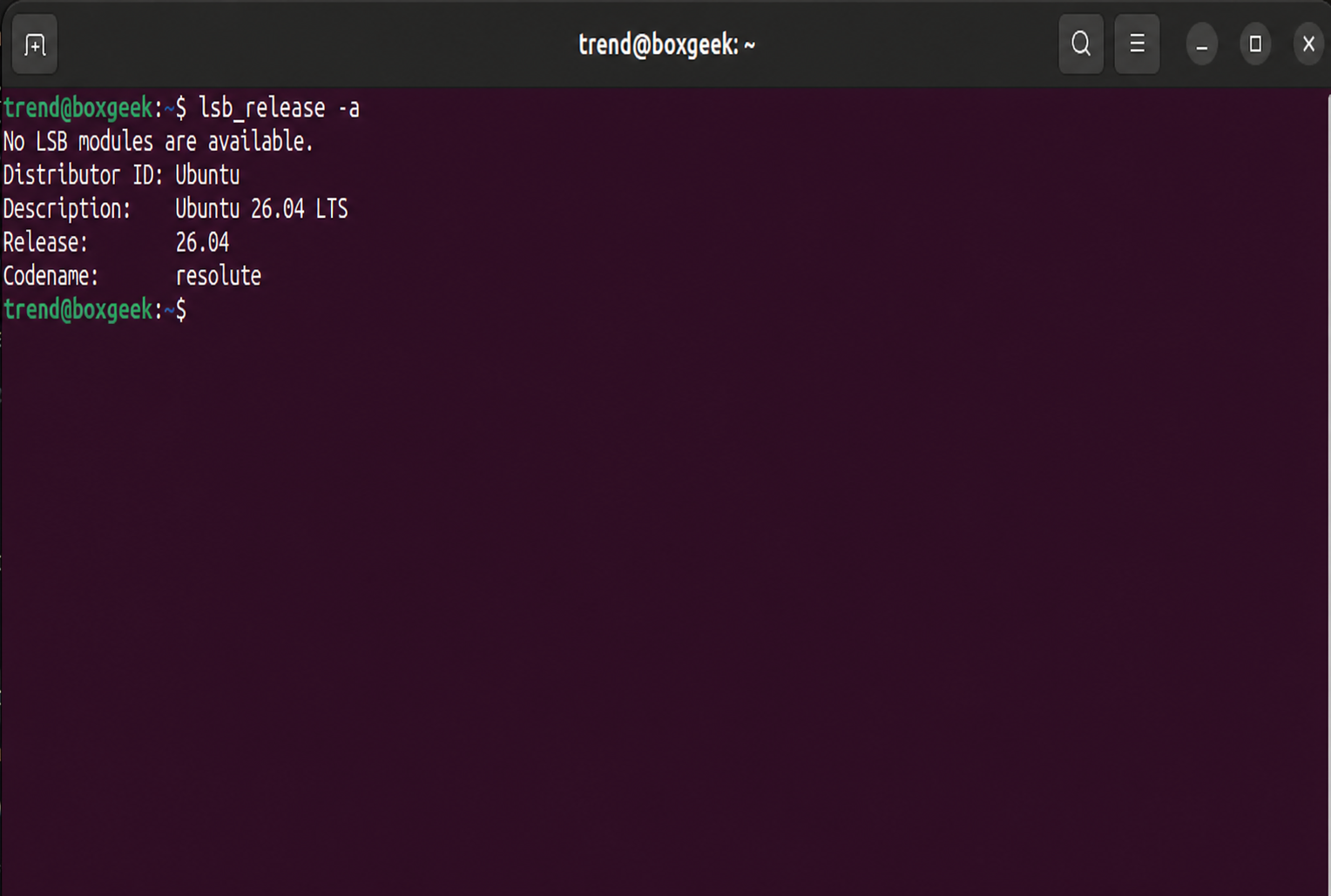
First, check your current Ubuntu operating system's version.
lsb_release -a
Expected Output:
Now update the package index and apply all upgrades using the below command.
sudo apt update && sudo apt full-upgrade -y
Expected Output:
Generating grub configuration file ...
Found linux image: /boot/vmlinuz-7.0.0-38-generic
Found initrd image: /boot/initrd.img-7.0.0-38-generic
Found linux image: /boot/vmlinuz-7.0.0-30-generic
Found initrd image: /boot/initrd.img-7.0.0-30-generic
done
Processing triggers for dracut (110-11ubuntu0.1)…
update-initramfs: Generating /boot/initrd.img-7.0.0-38-generic
Scanning processes...
Scanning linux images...

Pending kernel upgrade!
Running kernel version:
  7.0.0-30-generic
Diagnostics:
  The currently running kernel version is not the expected kernel version 7.0.0-38-generic.
On my server, full-upgrade pulled in a newer 26.04 kernel (7.0.0-38-generic). Clean up old dependencies and reboot the server before moving forward.
sudo apt autoremove --purge -y && sudo systemctl reboot
Once your server is back online and you are connected via SSH, verify that it booted into the latest 26.04 kernel.
uname -r
Expected Output:
7.0.0-38-generic
Switch the Release Upgrader from LTS to Normal
This is the step most people miss. Because Ubuntu 26.04 is a Long Term Support release and 26.10 is a 9-month interim release, /etc/update-manager/release-upgrades defaults to Prompt=lts. Until you change that, the server will ignore 26.10 completely.
grep "^Prompt=" /etc/update-manager/release-upgrades
Expected Output:
Prompt=lts
Switch the release channel to normal and confirm the change:
sudo sed -i 's/^Prompt=lts/Prompt=normal/' /etc/update-manager/release-upgrades && grep "^Prompt=" /etc/update-manager/release-upgrades
Expected Output:
Prompt=normal
Check for the 26.10 Release Metadata
Test whether the standard Ubuntu meta-release file is serving 26.10 yet:
sudo do-release-upgrade -c
Expected Output:
Checking for a new Ubuntu release
No new release found.
After release, the normal upgrade channel was not offering 26.10 yet. Canonical usually opens it up some time after release day. If you don't want to wait, the -d flag pulls it now.
sudo do-release-upgrade -c -d
Expected Output:
Checking for a new Ubuntu release
New release '26.10' available.
Run 'do-release-upgrade' to upgrade to it.
Pre-Flight Audit (Disk Space, Firewall, and Third-Party Repos)
Before starting an SSH upgrade on a remote server, check your available disk space on / and /boot, and see what third-party repositories live in /etc/apt/sources.list.d/.
ls -la /etc/apt/sources.list.d/ && df -h / /boot
Expected Output:
total 24
drwxr-xr-x 2 root root 4096 Aug  7 07:53 .
drwxr-xr-x 9 root root 4096 Aug  4 05:27 ..
-rw-r--r-- 1 root root  113 Aug  7 07:53 docker.list
-rw-r--r-- 1 root root  115 Aug  4 05:44 hashicorp.list
-rw-r--r-- 1 root root  398 Aug  4 05:21 ubuntu.sources
-rw-r--r-- 1 root root 2564 Apr 20 18:08 ubuntu.sources.curtin.orig
Filesystem                         Size  Used Avail Use% Mounted on
/dev/mapper/ubuntu--vg-ubuntu--lv   31G   13G   17G  44% /
/dev/sda2                          2.0G  184M  1.7G  11% /boot
This upgrade downloaded about 1.3 GB. Note any .list files from vendors like Docker, HashiCorp, Tailscale, or Grafana, because the upgrader disables all of them, and you will be rebuilding them afterward.
When you run do-release-upgrade over SSH, it spawns a fallback SSH daemon on port 1022 inside a screen session. If you run UFW on your server, open port 1022/tcp before you start so you can actually reach the recovery daemon if sshd hiccups.
If UFW is enabled, run the below command:
sudo ufw allow 1022/tcp
Run the Upgrade Over SSH
Let's start the upgrade.
sudo do-release-upgrade -d
Gotcha #1: The "Foreign Packages Installed" False Alarm
Right after the upgrader rewrites the package lists to stonking, it stops with an ominous warning about unofficial packages from an "unknown origin":
Expected Output:
Checking package manager
Reading package lists... Done
Building dependency tree... Done
Reading state information... Done

Foreign Packages Installed

The following unofficial packages are currently installed:

libbz2-1.0...............Installed from: unknown origin
libx11-6.................Installed from: unknown origin
libx11-data..............Installed from: unknown origin

It is recommended to install supported versions from the Ubuntu
archive, and try the upgrade again.

Do you want to continue the upgrade anyway?

Continue [yN]
These are not unofficial at all. These three packages are 100% official Ubuntu packages. However, resolute-security recently pushed libbz2-1.0 (1.0.8-6ubuntu0.1) and libx11-6 (2:1.8.13-1ubuntu0.1), which have higher version strings than the base stonking release pocket (1.0.8-6build2 and 2:1.8.13-1). When the upgrader changes your system's sources to 'stonking', it does not see 'resolute-security', so it assumes that these three packages have come from a third-party repository.
Don't downgrade them manually. I tested downgrading them to the base resolute versions (apt install --allow-downgrades), and do-release-upgrade immediately refused to start because it saw the security patches as uninstalled updates. Instead, type y and press Enter.
Expected Output:
Continue [yN] y

Calculating the changes

Do you want to start the upgrade?

1 package is going to be removed. 31 new packages are going to be
installed. 520 packages are going to be upgraded.

You have to download a total of 1,290 M. This download will take
about 4 minutes with a 40Mbit connection and about 34 minutes with a
5Mbit connection.

Fetching and installing the upgrade can take several hours. Once the
download has finished, the process cannot be canceled.

Continue [yN]  Details [d]
Type y and press Enter to begin downloading and installing Ubuntu 26.10.
What Happens During Installation
Now, at the last phase of the installation, you will see dbus-broker.service fail to reload.
Expected Output:
Setting up linux-image-generic (7.3.0-9.9)…
Setting up linux-generic (7.3.0-9.9)…
Setting up polkitd (127-3ubuntu1)…
Setting up packagekit (1.3.6-1ubuntu1)…
Job for dbus-broker.service failed.
See "systemctl status dbus-broker.service" and "journalctl -xeu dbus-broker.service" for details.
invoke-rc.d: initscript dbus, action "force-reload" failed.
...
Processing triggers for linux-image-7.3.0-9-generic (7.3.0-9.9)…
/etc/kernel/postinst.d/dracut:
dracut: Generating /boot/initrd.img-7.3.0-9-generic
Generating grub configuration file ...
Found linux image: /boot/vmlinuz-7.3.0-9-generic
Found initrd image: /boot/initrd.img-7.3.0-9-generic
done
Don't worry about the dbus-broker.service error here. D-Bus can't hot-swap over an active SSH session mid-upgrade, so it only comes up cleanly after you reboot.
At the end of the install, the upgrader offers to remove obsolete packages.
Expected Output:
Remove obsolete packages?

30 packages are going to be removed.

Continue [yN]  Details [d]
Press y to clean them up, and then press y when prompted to reboot the server.
Verify Ubuntu 26.10 and Systemd Health
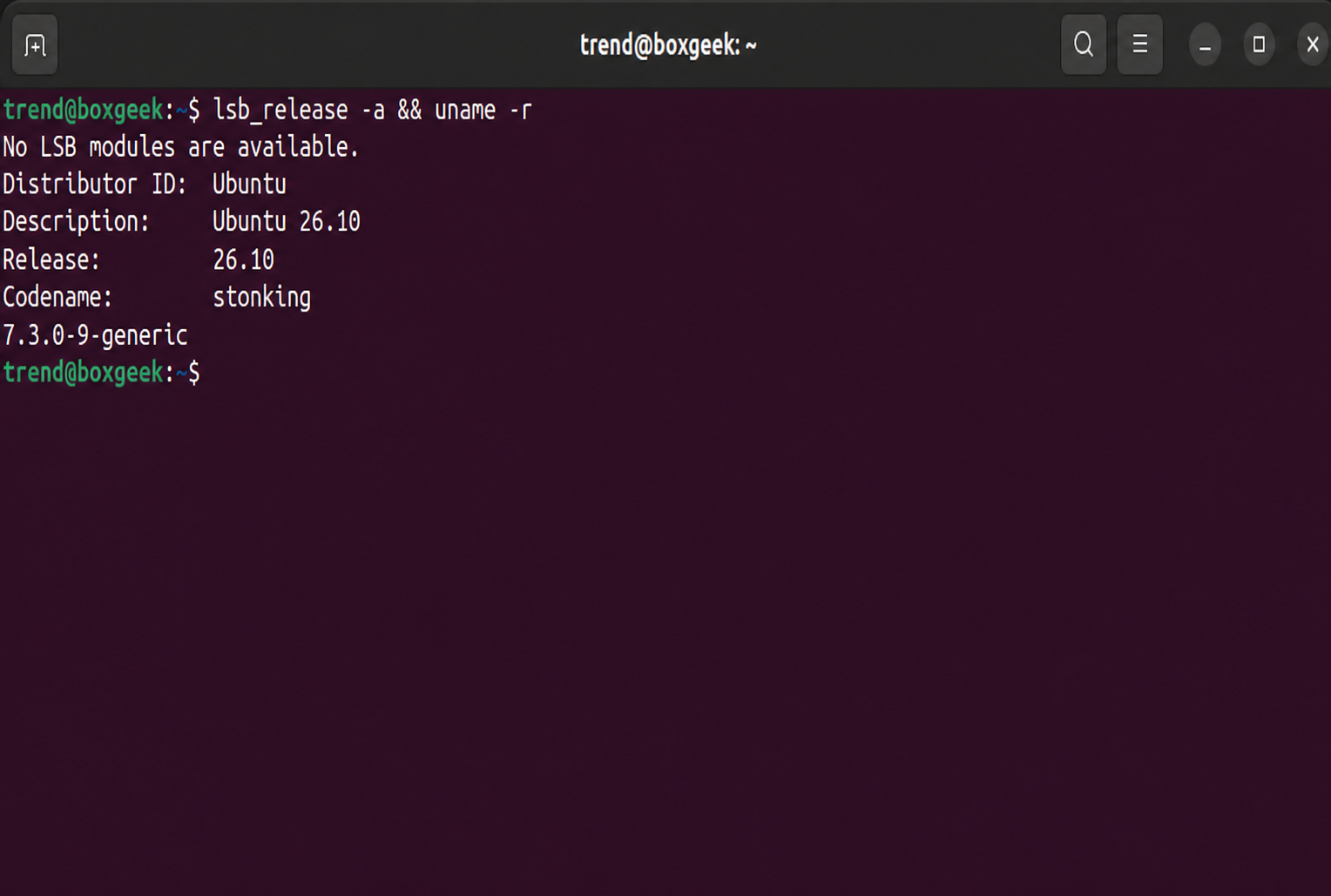
Wait a minute or two for the server to finish POST and boot back up, reconnect over SSH, and check your operating system version and running kernel.
lsb_release -a && uname -r
Expected Output:
Verify that dbus-broker is running properly now and that zero systemd units failed on boot:
systemctl is-active dbus-broker && systemctl --failed
Expected Output:
active
  UNIT LOAD ACTIVE SUB DESCRIPTION

0 loaded units listed.
Fix Disabled Third-Party Repos
If you only run stock Ubuntu packages, you're done.
If you run Docker, Terraform, or other vendor repositories on your server, here is where the post-upgrade cleanup starts.
Gotcha #2: Legacy .list Files Are Renamed to .list.disabled
Check /etc/apt/sources.list.d/ after the reboot:
ls -la /etc/apt/sources.list.d/ && cat /etc/apt/sources.list.d/docker.list.disabled /etc/apt/sources.list.d/hashicorp.list.disabled
Expected Output:
total 24
drwxr-xr-x 2 root root 4096 Oct 16 08:07 .
drwxr-xr-x 9 root root 4096 Oct 16 08:07 ..
-rw-r--r-- 1 root root  341 Oct 16 07:17 docker.list.disabled
-rw-r--r-- 1 root root  343 Oct 16 07:17 hashicorp.list.disabled
-rw-r--r-- 1 root root  398 Oct 16 07:26 ubuntu.sources
-rw-r--r-- 1 root root 2564 Apr 20 18:08 ubuntu.sources.curtin.orig
# This file could not be automatically migrated to a .sources file during the upgrade.
# Please see sources.list(5) (or https://manpages.ubuntu.com/manpages/man5/sources.list.5.html)
# for details on how to migrate manually.

# deb [arch=amd64 signed-by=/etc/apt/keyrings/docker.asc] https://download.docker.com/linux/ubuntu resolute stable
# This file could not be automatically migrated to a .sources file during the upgrade.
# Please see sources.list(5) (or https://manpages.ubuntu.com/manpages/man5/sources.list.5.html)
# for details on how to migrate manually.

# deb [signed-by=/usr/share/keyrings/hashicorp-archive-keyring.gpg] https://apt.releases.hashicorp.com resolute main
Ubuntu 26.10 wants third-party repos in the modern deb822 (.sources) format. Before creating those files, test whether each vendor actually has a stonking release pocket live yet:
for u in https://download.docker.com/linux/ubuntu/dists https://apt.releases.hashicorp.com/dists; do for s in stonking resolute; do echo "$s $(curl -s -o /dev/null -w '%{http_code}' $u/$s/Release) $u"; done; done
Expected Output:
stonking 200 https://download.docker.com/linux/ubuntu/dists
resolute 200 https://download.docker.com/linux/ubuntu/dists
stonking 404 https://apt.releases.hashicorp.com/dists
resolute 200 https://apt.releases.hashicorp.com/dists
Docker already returns HTTP 200 for stonking, while HashiCorp returns 404 for stonking and 200 for resolute. That means we can point Docker directly at stonking and keep HashiCorp pinned to resolute.
Create the deb822 /etc/apt/sources.list.d/docker.sources file:
sudo tee /etc/apt/sources.list.d/docker.sources > /dev/null <<'EOF'
Types: deb
URIs: https://download.docker.com/linux/ubuntu
Suites: stonking
Components: stable
Architectures: amd64
Signed-By: /etc/apt/keyrings/docker.asc
EOF
cat /etc/apt/sources.list.d/docker.sources
Expected Output:
Types: deb
URIs: https://download.docker.com/linux/ubuntu
Suites: stonking
Components: stable
Architectures: amd64
Signed-By: /etc/apt/keyrings/docker.asc
Now create /etc/apt/sources.list.d/hashicorp.sources pinned to resolute:
sudo tee /etc/apt/sources.list.d/hashicorp.sources > /dev/null <<'EOF'
Types: deb
URIs: https://apt.releases.hashicorp.com
Suites: resolute
Components: main
Signed-By: /usr/share/keyrings/hashicorp-archive-keyring.gpg
EOF
cat /etc/apt/sources.list.d/hashicorp.sources
Expected Output:
Types: deb
URIs: https://apt.releases.hashicorp.com
Suites: resolute
Components: main
Signed-By: /usr/share/keyrings/hashicorp-archive-keyring.gpg
Gotcha #3: HashiCorp GPG Key Rotation Caught by sqv
When I ran sudo apt update to test the new .sources files, Docker succeeded immediately, but HashiCorp threw a signature error from /usr/bin/sqv:
sudo apt update
Expected Output:
Get:1 https://download.docker.com/linux/ubuntu stonking InRelease [19.8 kB]
Get:2 https://apt.releases.hashicorp.com resolute InRelease [12.9 kB]
Err:2 https://apt.releases.hashicorp.com resolute InRelease
  Sub-process /usr/bin/sqv returned an error code (1), error message is: Missing key D55C0D1AC78A8D8126CB631CFC9CA96ACA026560, which is needed to verify signature.
Warning: Signature verification failed: https://apt.releases.hashicorp.com resolute InRelease: Sub-process /usr/bin/sqv returned an error code (1), error message is: Missing key D55C0D1AC78A8D8126CB631CFC9CA96ACA026560, which is needed to verify signature.
Error: The repository 'https://apt.releases.hashicorp.com resolute InRelease' is not signed.
HashiCorp rotated their package-signing key on September 9, 2026 (D55C0D1AC78A8D8126CB631CFC9CA96ACA026560), and the server's keyring from August still had the older key. Refresh the keyring directly from HashiCorp and inspect the key fingerprint:
curl -fsSL https://apt.releases.hashicorp.com/gpg | sudo gpg --dearmor --yes -o /usr/share/keyrings/hashicorp-archive-keyring.gpg && gpg --show-keys /usr/share/keyrings/hashicorp-archive-keyring.gpg
Expected Output:
pub   rsa4096 2026-09-09 [SC] [expires: 2031-09-08]
      D55C0D1AC78A8D8126CB631CFC9CA96ACA026560
uid                      HashiCorp Security (HashiCorp Package Signing) [[email protected]]
Now run apt update and check candidate packages from both repositories:
sudo apt update && apt-cache policy docker-ce terraform | grep -E "^[a-z]|Installed|Candidate"
Expected Output:
Hit:1 https://download.docker.com/linux/ubuntu stonking InRelease
Get:2 https://apt.releases.hashicorp.com resolute InRelease [12.9 kB]
Get:3 https://apt.releases.hashicorp.com resolute/main amd64 Packages [327 kB]
Hit:4 http://in.archive.ubuntu.com/ubuntu stonking InRelease
Hit:5 http://security.ubuntu.com/ubuntu stonking-security InRelease
Hit:6 http://in.archive.ubuntu.com/ubuntu stonking-updates InRelease
Hit:7 http://in.archive.ubuntu.com/ubuntu stonking-backports InRelease
Fetched 340 kB in 1s (273 kB/s)
8 packages can be upgraded. Run 'apt list --upgradable' to see them.
docker-ce:
  Installed: 5:29.9.1-1~ubuntu.26.04~resolute
  Candidate: 5:29.9.1-1~ubuntu.26.10~stonking
terraform:
  Installed: 1.15.8-1
  Candidate: 1.16.6-1
Upgrade Vendor Packages to Native 26.10 Builds and Clean Up
Upgrade the remaining Docker and Terraform packages so your server runs native ubuntu.26.10~stonking builds:
sudo apt full-upgrade -y && docker --version && terraform version
Expected Output:
Setting up docker-buildx-plugin (0.38.0-1~ubuntu.26.10~stonking)…
Setting up containerd.io (2.4.2-2~ubuntu.26.10~stonking)…
Setting up docker-compose-plugin (5.6.0-1~ubuntu.26.10~stonking)…
Setting up docker-model-plugin (1.2.6-1~ubuntu.26.10~stonking)…
Setting up docker-ce-cli (5:29.9.1-1~ubuntu.26.10~stonking)…
Setting up docker-ce-rootless-extras (5:29.9.1-1~ubuntu.26.10~stonking)…
Setting up terraform (1.16.6-1)…
Setting up docker-ce (5:29.9.1-1~ubuntu.26.10~stonking)…
Docker version 29.9.1, build dfc520d
Terraform v1.16.6
on linux_amd64
+ provider registry.terraform.io/hashicorp/aws v6.57.1
Confirm that docker and containerd are active and remove the leftover .list.disabled backup files:
systemctl is-active docker containerd && sudo rm -v /etc/apt/sources.list.d/*.list.disabled
Expected Output:
active
active
removed '/etc/apt/sources.list.d/docker.list.disabled'
removed '/etc/apt/sources.list.d/hashicorp.list.disabled'
That leaves the server running Ubuntu 26.10 (stonking) on kernel 7.3, with clean deb822 vendor sources and zero broken dependencies. Leave Prompt=normal in /etc/update-manager/release-upgrades so the server is ready for the 27.04 jump when the 9-month support window wraps up next year.
