
I have Proxmox 8 and I upgraded it to Proxmox 9. Every command and every prompt below is what you will actually see. In Proxmox VE 9 you will see Debian 13 "Trixie", kernel 7.0, and apt 3.0 with its new deb822 repository format. This upgrade is clean, but you will get stuck at four or five places where it stops and asks you something, and one repository that quietly reappears and breaks apt update afterwards.
The official Proxmox 8 to 9 upgrade guide and the Debian 13.7 release notes.
Production vs Homelab Prep
Before touching apt, secure your setup.
For Homelab: Back up your VMs and LXCs to a Proxmox Backup Server or an external NAS. Local node snapshots will not save you if the hypervisor bricks. Copy your /etc/network/interfaces file somewhere safe just in case the upgrade renames a network bridge.
For Production: Live-migrate everything off the target node. Check Corosync and Ceph health. Never upgrade a degraded cluster, and only ever upgrade one node at a time.
Update PVE 8 First
You need the latest 8.4 packages before upgrading to 9. Let's fix your repositories, assuming you do not have a paid enterprise subscription.
sudo rm -f /etc/apt/sources.list.d/pve-enterprise.list
echo "deb http://download.proxmox.com/debian/pve bookworm pve-no-subscription" | sudo tee /etc/apt/sources.list.d/pve-no-subscription.list
sudo apt update && sudo apt dist-upgrade -y
If you see a '401 Unauthorized' error, that means the enterprise Ceph repository is still active. If you do not use Ceph, kill it.
sudo rm -f /etc/apt/sources.list.d/ceph.list
sudo apt update && sudo apt dist-upgrade -y
Reboot the Proxmox Server so you are running the latest 6.8 kernel before starting the major version jump.
Run the Upgrade Checker
Proxmox includes a script to catch upgrade blockers. Run it in full mode.
sudo pve8to9 --full
You may see a failure for systemd-boot. The meta package conflicts with the new bootloader packages, so we remove it.
sudo apt remove systemd-boot
Verify that it only wants to remove that single package, then press yes. Re-run sudo pve8to9 --full until you have zero failures. If it warns you about missing Intel microcode, install it on production hardware.
Swap Repos to Trixie
Now it's time to point apt at Debian 13.
sudo sed -i 's/bookworm/trixie/g' /etc/apt/sources.list
echo "deb http://download.proxmox.com/debian/pve trixie pve-no-subscription" | sudo tee /etc/apt/sources.list.d/pve-no-subscription.list
sudo apt update
You should see around 600 packages ready to upgrade.
The Upgrade
Do not run this over a raw SSH session. If your connection drops, your node is dead. Use Proxmox screen instead.
sudo apt install -y screen
screen -S pve9
sudo apt dist-upgrade
You will see a few prompts when the upgrade starts. Here is how to answer them so you do not break your configuration.
First, you will see a prompt like the screenshot below.
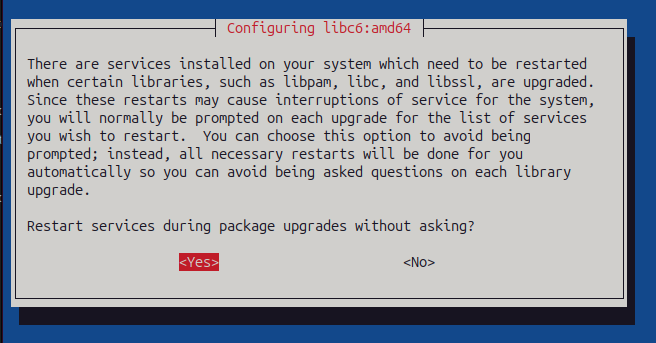
Restart services without asking? Choose Yes.
Next, the installation will stop at : — press q to skip reading the changelogs.
Next, you will see the Keyboard layout prompt.
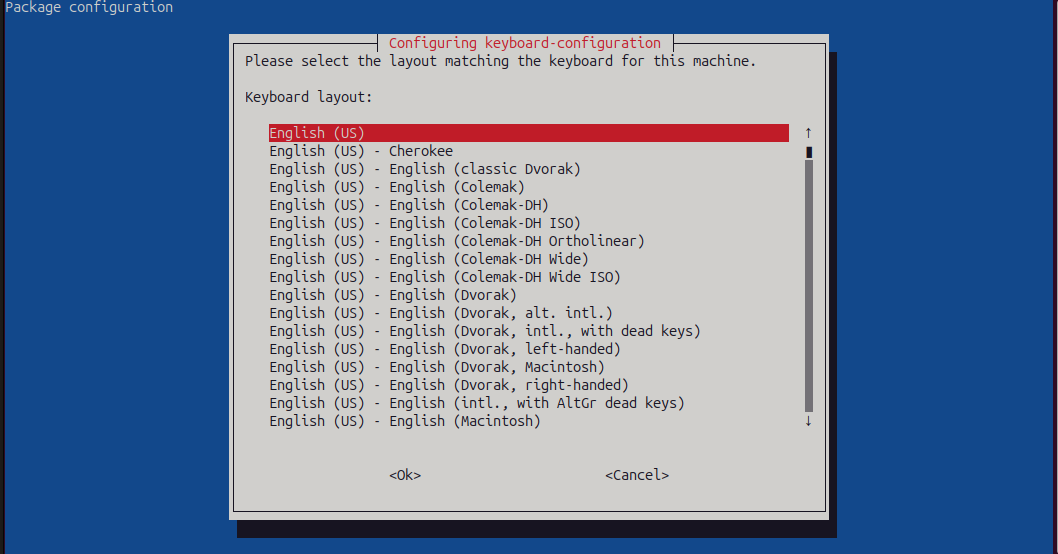
Select English (US). It is a headless server, so the layout does not matter.
One more: for config file conflicts (sshd_config, lvm.conf), press N to keep your current versions.
Reboot and Clean Up
Reboot the Proxmox server to load kernel 7.0.
sudo systemctl reboot
Once it's back, log in and migrate your sources to the new apt 3.0 deb822 format.
sudo apt modernize-sources
Now, one final trap. Proxmox 9 re-installs the enterprise repository during the upgrade. If you try to run apt update now, it will fail with a 401 error. So delete the new sources file.
sudo rm -f /etc/apt/sources.list.d/pve-enterprise.sources
sudo apt update
sudo pveversion
You should see pve-manager/9.x.x running a 7.x kernel. To check your Proxmox network bridge, start one VM and verify it.
Post-Upgrade Gotchas to Watch
SSH lockouts: OpenSSH 10 removes DSA keys and disables modp Diffie-Hellman key exchange by default. Legacy devices and old deployment scripts might fail to connect to your node.
Rsync backups: Rsync 3.5 restricts symlinks. If you have custom backup scripts that rely on untrusted symlinks, they will throw a "refusing to follow a symlink" error.
