
If you are running a MikroTik router with SSH facing the public internet, you need to patch it right now. Attackers are actively exploiting a series of dangerous vulnerabilities known as "MikroTrick". Through this, they gain control of the devices without needing a password or private key. Poland's national CSIRT team, CERT Polska, caught this in the wild, and it's exactly as bad as it sounds.
If you manage a MikroTik RouterOS device with SSH accessible from public networks, you must act immediately.
How the Exploit Chain Works
How are they getting in? It is a combination of two critical flaws that let attackers completely bypass SSH authentication.
CVE-2026-67276 (SSH Auth Bypass): This flaw breaks public key verification. Normally, an SSH server checks the incoming signature against your stored public key. An RSA key has a modulus and an exponent. RouterOS checked the modulus but ignored the exponent. This is a big mistake. If an attacker knows your modulus, they can forge a key with an exponent of 1. Since any number to the power of 1 is itself, the math works out perfectly. They generate a valid signature without ever touching your private key.
CVE-2026-86060 (Privilege Escalation): Bypassing authentication is not enough on its own. The attacker still needs admin rights. To get them, they log in with a strange username starting with a hyphen, like -2. RouterOS passes this to an old login helper. That helper reads the hyphen as a command-line flag instead of a name. This trick lets the attacker overwrite the system's policy mask. They grant themselves full administrative control.
There is also a third bug involved. CVE-2026-67277 affects the bandwidth-test service. It can leak kernel memory or crash the router completely. MikroTik patched this alongside the SSH flaws.
How to Tell if You're Compromised
Early September, these attacks started. The primary attack IP we see in the wild is 82.192.72.4.
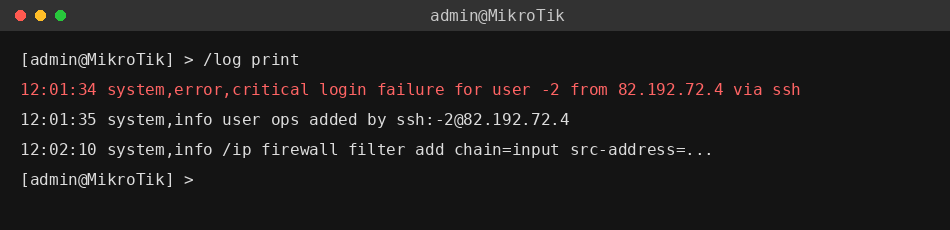
You need to check your router's logs immediately. Look for these exact lines.
login failure for user -2 from [ip] via ssh
user [name] added by ssh:-2@[ip]
You should also review your user list. Look for a new admin account named ops. If you see that account, or those specific log entries, your router has been breached.
The Fix & The "Flagged" State
MikroTik released fixes immediately. You must upgrade your RouterOS to one of these specific versions.
- 7.25beta3
- 7.24.2
- 7.23.4
- 6.49.21
These fixed versions include a new defense mechanism. When the router boots up, it scans for signs of this exact compromise. If it spots unauthorized changes, it disables them. It then drops a critical error in the log and marks your router as "Flagged". You can check this status by running /system/device-mode/print. However, even if your router is not flagged, you must manually check your users and scripts to be completely sure.
Your Action Plan
Patch it: Get on one of the fixed versions today.
Check your configs: Look for the ops user, weird scripts, or rogue proxy tunnels.
If you got hit: Don't just delete the rogue user. Secure your logs, factory reset the router, and rebuild your config from scratch. Change every password and key you had on that box.
Can't update right now? If you are stuck and can't reboot or patch today, lock down your firewall. Block SSH, WWW, WWW-SSL, and the bandwidth server from the outside world. Only allow access from your trusted management IPs.
